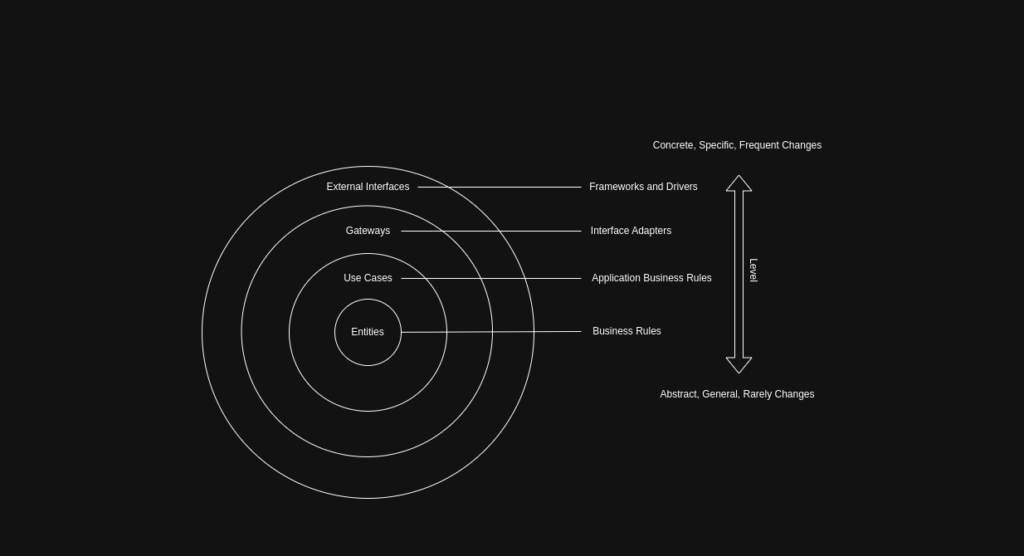
Clean Architecture is a software design philosophy introduced by Robert C. Martin (Uncle Bob) that aims to create systems that are independent of frameworks, UI, databases, and external agencies.
The code examples referenced in the following article can be found in the repository at https://github.com/samsaydali7/clean-architecture/tree/main.
Clean Architecture is a software design philosophy that promotes the separation of concerns and independence from frameworks, databases, and external agencies. By organizing code into distinct layers, it ensures that the core business logic remains isolated and adaptable, making applications easier to maintain, test, and scale.
Entities
Entities represent the core business logic and rules of your application.
They encapsulate the most general and high-level concepts that are central to your business domain, such as data structures and business rules. Entities are independent of specific use cases, frameworks, or external technologies, which means they can be reused across different parts of the application or even in different applications altogether.
BankAccount example
Represents a bank account, holding data such as account number, balance, owner, and related transactions.
public class BankAccount {
    private final String id;
    private final String userId;
    private Money balance;

    public void deposit(Money amount) {
        if (amount == null) throw new IllegalArgumentException("Amount cannot be null.");
        balance = balance.add(amount);
    }

    public void withdraw(Money amount) {
        if (amount == null) throw new IllegalArgumentException("Amount cannot be null.");
        if (!balance.isGreaterThanOrEqual(amount)) {
            throw new IllegalArgumentException("Insufficient balance.");
        }
        balance = balance.subtract(amount);
    }

    public void transferTo(BankAccount targetAccount, Money amount) {
        this.withdraw(amount);
        targetAccount.deposit(amount);
    }
}
Money example
Encapsulates money-related information, such as amount and currency, to be used for financial transactions.
public class Money {
    private final BigDecimal amount;

    public Money(BigDecimal amount) {
        if (amount == null || amount.compareTo(BigDecimal.ZERO) < 0) {
            throw new IllegalArgumentException("Amount must be non-negative.");
        }
        this.amount = amount;
    }

    public Money add(Money other) {
        return new Money(this.amount.add(other.amount));
    }

    public Money subtract(Money other) {
        BigDecimal result = this.amount.subtract(other.amount);
        if (result.compareTo(BigDecimal.ZERO) < 0) {
            throw new IllegalArgumentException("Insufficient funds.");
        }
        return new Money(result);
    }
}
Transaction example
Models a transaction record, including details like the transaction amount, type, date, and accounts involved.
public class Transaction {
    private final String id;
    private final String fromAccountId;
    private final String toAccountId;
    private final Money amount;
    private final TransactionType type;
    private final LocalDateTime timestamp;

    public Transaction(String fromAccountId, String toAccountId, Money amount, TransactionType type) {
        this.id = UUID.randomUUID().toString();
        this.fromAccountId = fromAccountId;
        this.toAccountId = toAccountId;
        this.amount = amount;
        this.type = type;
        this.timestamp = LocalDateTime.now();
    }
}
TransactionType example
Defines the possible types of transactions (e.g., deposit, withdrawal) as an enumeration.
public enum TransactionType {
    DEPOSIT,
    WITHDRAWAL,
    TRANSFER
}
Use Cases
Use Cases, define the application-specific business logic.

They implement the various operations that users or systems can perform, orchestrating the flow of data to and from Entities.
Use Cases are responsible for executing business processes, enforcing business rules, and ensuring that the necessary steps are carried out for a given operation.
By isolating application logic in this layer, Clean Architecture makes it easier to understand, modify, and test the specific behaviors of your application without being affected by external changes.
Deposit Use Case Example
This is a simple Data Transfer Object (DTO) that carries the data needed for a deposit operation:
public class DepositFundsDto {
    String accountId;
    BigDecimal amount;

    public DepositFundsDto(String accountId, BigDecimal amount) {
        this.accountId = accountId;
        this.amount = amount;
    }
}
DTOs (Data Transfer Objects) are used in Use Cases to create a clear separation between the core business logic and the outside world, allowing data to be passed in and out without exposing or tightly coupling internal domain models to external interfaces. By defining specific input and output DTOs, Use Cases can safely receive and return only the necessary information, making the application more maintainable, testable, and resilient to changes in external systems, user interfaces, or frameworks.
This is an interface representing the deposit use case. It defines a single method:
public interface DepositFundsUseCase {
    void execute(DepositFundsDto dto);
}
This makes the use case independent of any concrete implementation, following the dependency inversion principle.
public class DepositFundsUseCaseImpl implements DepositFundsUseCase {
    private final AccountRepository accountRepository;

    public DepositFundsUseCaseImpl(AccountRepository accountRepository) {
        this.accountRepository = accountRepository;
    }
    @Override
    public void execute(DepositFundsDto dto) {
        BankAccount account = accountRepository.findById(dto.accountId);
        if (account == null) {
            throw new IllegalArgumentException("Account not found: " + dto.accountId);
        }
        account.deposit(new Money(dto.amount));
        accountRepository.save(account);
    }
}
Transfer Funds Example
Similarly, the transfer funds can be.
public class TransferFundsUseCaseImpl implements TransferFundsUseCase {

    private final AccountRepository accountRepository;
    private final TransactionRepository transactionRepository;

    public TransferFundsUseCaseImpl(AccountRepository accountRepository,
                                TransactionRepository transactionRepository) {
        this.accountRepository = accountRepository;
        this.transactionRepository = transactionRepository;
    }

    @Override
    public void execute(TransferFundsDto dto) {
        if (dto.fromAccountId.equals(dto.toAccountId)) {
            throw new IllegalArgumentException("Cannot transfer to the same account.");
        }

        BankAccount fromAccount = accountRepository.findById(dto.fromAccountId);
        BankAccount toAccount = accountRepository.findById(dto.toAccountId);

        if (fromAccount == null || toAccount == null) {
            throw new IllegalArgumentException("One or both accounts not found.");
        }

        Money money = new Money(dto.amount);

        fromAccount.transferTo(toAccount, money);

        accountRepository.save(fromAccount);
        accountRepository.save(toAccount);

        Transaction transaction = new Transaction(
                dto.fromAccountId,
                dto.toAccountId,
                money,
                TransactionType.TRANSFER
        );

        transactionRepository.record(transaction);
    }
}
Gateways
Gateways, act as the bridges between the application’s core logic and the outside world.

They define abstract interfaces for interacting with external resources such as databases, web services, or other APIs.
By depending on abstractions rather than concrete implementations, Use Cases can interact with persistence or communication layers without knowing any technical details.
public interface TransactionRepository {
    void record(Transaction transaction);
    List<Transaction> findByAccountId(String accountId); // optional, for history
}
This abstraction enables easy swapping or mocking of infrastructure components, fostering flexibility and testability.
public class InMemoryTransactionRepository implements TransactionRepository {

    private final List<Transaction> transactions = new ArrayList<>();

    @Override
    public void record(Transaction transaction) {
        transactions.add(transaction);
    }

    @Override
    public List<Transaction> findByAccountId(String accountId) {
        List<Transaction> result = new ArrayList<>();
        for (Transaction t : transactions) {
            if (accountId.equals(t.getFromAccountId()) || accountId.equals(t.getToAccountId())) {
                result.add(t);
            }
        }
        return Collections.unmodifiableList(result); // read-only
    }

    public void clear() {
        transactions.clear();
    }

    public List<Transaction> getAllTransactions() {
        return Collections.unmodifiableList(transactions);
    }
}
External Interfaces
This layer includes controllers, presenters, database access code, web API clients, and any other code that deals with external technology.
The primary goal of the External Interfaces layer is to keep all framework- and technology-specific code isolated from the core business logic, allowing you to replace or upgrade external systems with minimal impact on the rest of your application.
Transfers from a file example
This class reads a file containing transfer instructions (from account, to account, amount), and for each line, it triggers a funds transfer using the provided use case. It logs the result of each transfer or any errors.
public class TransferFromFileController {
    private final TransferFundsUseCase transferFundsUseCase;

    public TransferFromFileController(TransferFundsUseCase transferFundsUseCase) {
        this.transferFundsUseCase = transferFundsUseCase;
    }

    public void processFile(String filePath) {
        try (BufferedReader reader = new BufferedReader(new FileReader(filePath))) {
            String line;

            while ((line = reader.readLine()) != null) {
                // Expected format: fromId,toId,amount
                String[] parts = line.split(",");

                if (parts.length != 3) {
                    System.out.println("Skipping invalid line: " + line);
                    continue;
                }

                String fromId = parts[0].trim();
                String toId = parts[1].trim();
                BigDecimal amount = new BigDecimal(parts[2].trim());

                TransferFundsDto dto = new TransferFundsDto(fromId, toId, amount);

                try {
                    transferFundsUseCase.execute(dto);
                    System.out.println("✅ Transferred " + amount + " from " + fromId + " to " + toId);
                } catch (Exception e) {
                    System.out.println("❌ Failed to transfer: " + e.getMessage());
                }
            }
        } catch (Exception e) {
            System.out.println("Error reading file: " + e.getMessage());
        }
    }
}
Another option, console example!
This class interacts with the user via the console, asking for transfer details (from account, to account, amount). It performs the transfer using the provided use case and prints the result. The session continues until “exit” is entered.
public class TransferFromConsoleController {
    private final TransferFundsUseCase transferFundsUseCase;

    public TransferFromConsoleController(TransferFundsUseCase transferFundsUseCase) {
        this.transferFundsUseCase = transferFundsUseCase;
    }

    public void run() {
        Scanner scanner = new Scanner(System.in);

        while (true) {
            System.out.print("Enter fromAccountId (or 'exit'): ");
            String from = scanner.nextLine();
            if ("exit".equalsIgnoreCase(from)) break;

            System.out.print("Enter toAccountId: ");
            String to = scanner.nextLine();

            while (true) {
                System.out.print("Enter amount (or 'exit'): ");

                String line = scanner.nextLine();
                if ("exit".equalsIgnoreCase(line)) break;

                BigDecimal amount = new BigDecimal(line);

                TransferFundsDto dto = new TransferFundsDto(from, to, amount);

                try {
                    transferFundsUseCase.execute(dto);
                    System.out.println("✅ Transfer successful.");
                } catch (Exception e) {
                    System.out.println("❌ Error: " + e.getMessage());
                }
            }

        }
        System.out.println("Console transfer session ended.");
    }
}
Main
In Clean Architecture, the main component (or entry point) is intentionally designed as the “dirtiest” part of the application. Unlike the core business logic, which remains pure and independent, the main component is where dependencies are resolved, implementations are injected, and the application is wired together.
This is the place where you link all the layers—Entities, Use Cases, Gateways, and External Interfaces—by providing concrete implementations for abstractions and setting up how different parts of the system interact. By keeping this wiring isolated in the main component, the rest of the system remains clean, decoupled, and easy to test or modify.
public class Main {
    public static void main(String[] args) {
        // Instantiate the implementations
        AccountRepository accountRepository = new InMemoryAccountRepository();
        TransactionRepository transactionRepository = new InMemoryTransactionRepository();

        // Preload some accounts
        BankAccount a1 = new BankAccount("A1", "user-1");
        a1.deposit(new Money(new BigDecimal("1000")));
        BankAccount a2 = new BankAccount("A2", "user-2");

        accountRepository.save(a1);
        accountRepository.save(a2);

        // Instantiate use-case the implementations
        TransferFundsUseCase useCase = new TransferFundsUseCaseImpl(accountRepository, transactionRepository);

        switch (args[0]) {
            // File-based example
            case "file": {
                TransferFromFileController fileController = new TransferFromFileController(useCase);
                String filePath = Objects.requireNonNull(Main.class.getClassLoader()
                                .getResource("transfers.csv"))
                        .getPath();
                fileController.processFile(filePath);
                break;
            }
            // Or console example
            case "cli":
            default: {
                TransferFromConsoleController consoleController = new TransferFromConsoleController(useCase);
                consoleController.run();
                break;
            }
        }

    }
}
Boundaries
Clean Architecture establishes clear boundaries between different layers of the application. These boundaries are defined using interfaces or abstract classes, ensuring that each layer only depends on abstractions, not concrete implementations.
For example, Use Cases depend on gateway interfaces, not on the details of how data is stored or retrieved. This separation allows each part of the system to evolve independently, and makes it easy to swap implementations, such as replacing a database or UI, without affecting core business logic.
“Boundary crossing” refers to the movement of data and control between different layers of the system, such as from external interfaces (like controllers or user interfaces) into use cases, and from use cases into entities or gateways.
Stable and Unstable Components

A crucial concept in Clean Architecture is the distinction between stable and unstable components:
- Stable components are those that change rarely and are depended upon by many other parts of the system. In Clean Architecture, Entities and Use Cases are the most stable components. Since they encapsulate core business logic, they should remain as independent and unchanging as possible.
- Unstable components are those that are likely to change frequently, such as frameworks, user interfaces, or external services. External Interfaces and the main component fall into this category. By ensuring that the stable core only depends on abstractions and not on unstable components, you protect your business logic from ripple effects caused by external changes.
This separation of stable and unstable components, enforced by boundaries and the strategic use of the main component for wiring, is what gives Clean Architecture its flexibility, maintainability, and resilience to change.
Conclusion
Clean Architecture provides a powerful framework for building robust, maintainable, and adaptable software systems by organizing code into clear layers — Entities, Use Cases, Gateways, and External Interfaces. By enforcing the separation of concerns and defining strict boundaries between layers, it allows the core business logic to remain independent from external technologies, frameworks, and interfaces. The use of DTOs and boundary crossing ensures that communication between layers is controlled and stable, preventing ripple effects from changes in unstable components to the stable core. The main component serves as the “dirtiest” part of the system, where dependencies are wired together and implementations are injected, keeping the rest of the architecture clean and decoupled. Altogether, Clean Architecture empowers developers to create applications that are easier to test, evolve, and maintain over time, especially as requirements and technologies change.